Background
I’ve been spending some time looking at browser extensions as a security target. They are interesting because they sit between the browser and the network, operate with elevated permissions, and users generally trust them implicitly. The whole point of a privacy extension is that you are relying on it to do things on your behalf without second-guessing every action it takes.
DuckDuckGo Privacy Essentials includes an AMP Protection feature that tries to redirect users away from AMP pages and back to the canonical source. That is a legitimately useful feature. AMP pages are tracked, stripped of functionality, and often feel like a worse version of the real site. Getting bounced to the actual article instead is a good thing.
The problem is in how the extension figures out where to redirect you when it encounters a “first-party AMP” page, one that’s hosted directly by the publisher rather than served from a Google AMP cache.
This was found using Claude Code with Bitwarden’s AI Security Plugins. I work on the Bitwarden AppSec team, though this is personal research, not anything official. I’m using open source tools I actually use day-to-day as targets while I get more experience with the plugin workflow. I don’t want to obscure the AI involvement in the process.
How AMP Protection Works
The extension has two modes for AMP handling:
Pattern matching, for known Google AMP cache URL formats (e.g.
https://www.google.com/amp/s/example.com/article). The canonical URL is embedded directly in the AMP URL itself, so no network request is needed to extract it.Deep extraction, for first-party AMP pages where the publisher hosts their own
/amp/version. The extension fetches the page from its background service worker, parses the HTML, finds the<link rel="canonical">element, and uses that href as the redirect target.
Deep extraction is Firefox-only. Firefox MV2 allows a blocking webRequest.onBeforeRequest listener to return a Promise, which lets the extension perform an async fetch and redirect before the original navigation completes. Chrome MV3 does not allow this.
The vulnerability is in deep extraction.
The Vulnerability
- File:
shared/js/background/amp-protection.js - Function:
fetchAMPURL() - CWE: CWE-601: URL Redirection to Untrusted Site (‘Open Redirect’)
- Affected versions: 2026.1.12 and presumably all prior versions
The vulnerable code
fetchAMPURL() extracts the canonical link and validates it like this:
const firstCanonicalLink = doc.querySelector('[rel="canonical"]');

if (firstCanonicalLink && firstCanonicalLink instanceof HTMLLinkElement) {
    // Only follow http(s) links
    if (!isHttpUrl(firstCanonicalLink.href)) {
        return null;
    }

    const newSite = new Site(firstCanonicalLink.href);

    if (isSiteExcluded(newSite)) {
        return null;
    }

    return firstCanonicalLink.href;  // returned with no origin check
}
isHttpUrl() only checks that the scheme is http or https. isSiteExcluded() rejects localhost, 127.0.0.1, and a handful of named entries from the remote config. That’s it. There is no check that the canonical URL shares the same origin, domain, or even the same registrable domain as the page being visited.
The returned URL goes directly into a { redirectUrl: canonicalUrl } response from the blocking webRequest.onBeforeRequest listener, which tells Firefox to navigate the tab to that URL before the original page ever loads.
So: attacker registers a domain with amp anywhere in the path, serves a page with a <link rel="canonical" href="https://attacker.example/">, and DuckDuckGo Privacy Essentials will silently redirect the victim’s tab to attacker.example when they click the link. The address bar changes. No warning is shown. The extension does not surface anything to the user.
The only HTML needed on the attacker’s page:
<link rel="canonical" href="https://attacker.example/phishing-page">
Proof of Concept
Setup
localhost and 127.0.0.1 are explicitly excluded by the extension config, so the PoC needs two local hostnames:
sudo sh -c 'echo "127.0.0.1  amp-poc.test" >> /etc/hosts'
sudo sh -c 'echo "127.0.0.1  phishing.test" >> /etc/hosts'
Two Python servers: one serving the attacker AMP page at http://amp-poc.test:8080/amp/, one serving the redirect destination at http://phishing.test:8081/.
The attacker page at /amp/ contains:
<link rel="canonical" href="http://phishing.test:8081/">
Enabling deep extraction
The CDN config currently ships with deepExtractionEnabled: false, which disables the vulnerable code path. To demonstrate the vulnerability in a running extension without reinstalling, you can mutate the in-memory config from the extension’s background page console in about:debugging:
globalThis.components.remoteConfig.config.features.ampLinks.settings.deepExtractionEnabled = true
This takes effect immediately and persists until the next CDN config fetch (~15 minutes).
The redirect
- Visit
http://amp-poc.test:8080/, a realistic-looking news article page with a “Read full story” link pointing tohttp://amp-poc.test:8080/amp/ - Click the link
- The extension detects
/amp/in the URL, fetches the page, reads the canonical link, and issues{ redirectUrl: "http://phishing.test:8081/" } - Firefox navigates to
phishing.test:8081
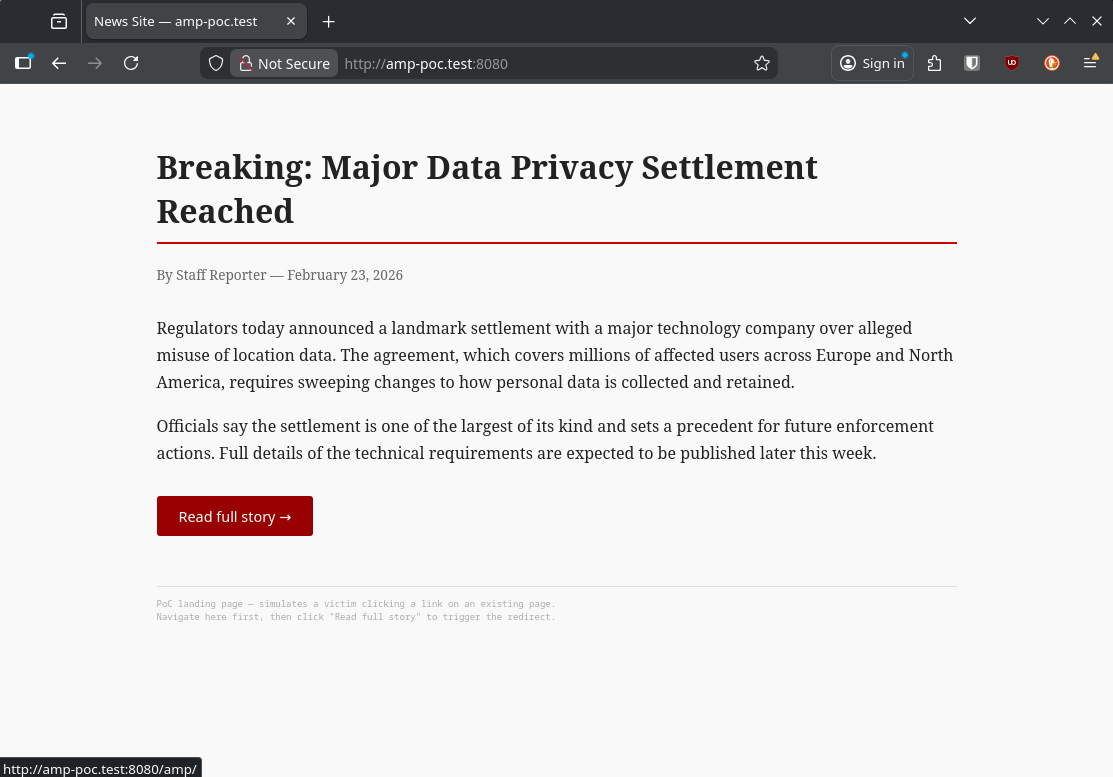
The attacker page. Nothing here looks suspicious to a victim.
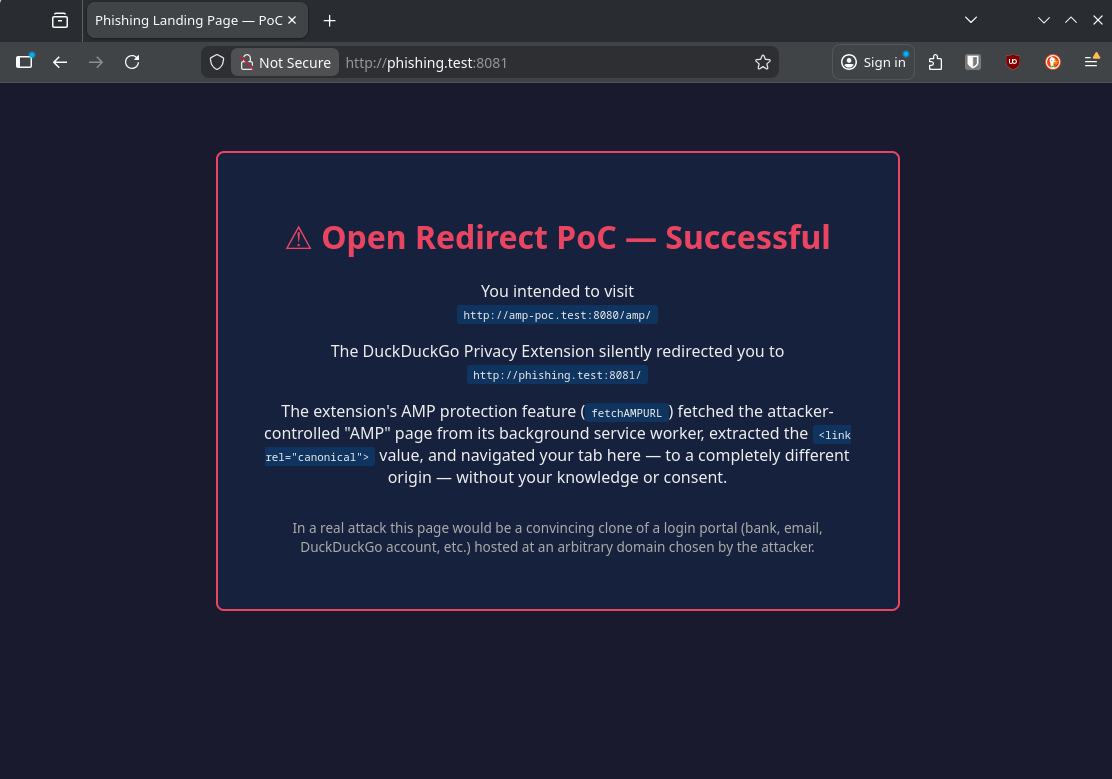
After clicking the link. The address bar changed to phishing.test:8081 with no warning.
Current Mitigation Status
DuckDuckGo’s CDN currently serves deepExtractionEnabled: false for Firefox, which disables the code path entirely. I confirmed this directly against the live config endpoint (https://staticcdn.duckduckgo.com/trackerblocking/config/v4/extension-firefox-config.json). The field is false as of today. DuckDuckGo closed the HackerOne report as Informative on this basis.
That said, this is a server-side configuration toggle, not a code fix. The vulnerable code is still in the extension. Enabling the feature requires no code change and no extension update. It is a single field in a remote JSON config the extension fetches automatically. DuckDuckGo could flip deepExtractionEnabled to true for any subset of users at any time: a gradual rollout, an A/B test, a configuration error. A user who had the extension installed when the flag was false would have no indication that their behavior changed when the flag became true. The vulnerability would be re-exposed silently, to however many users the flag was enabled for.
Why This Matters
The redirect is particularly credible in the context of a privacy extension. Users who have DuckDuckGo installed are already accustomed to being bounced cross-domain by the extension’s AMP protection. Arriving at an unexpected URL after clicking a link is something the extension does on purpose. That’s the whole point. A victim landing on a phishing page after a DuckDuckGo-issued redirect has no obvious reason to suspect anything is wrong.
A few scenarios:
- Credential phishing. Attacker registers
news-amp.example.com, hosts/amp/articlewith a canonical pointing to a cloned login page. Link gets dropped in an email or Slack message. Victim clicks, extension redirects them, they see a login prompt on what looks like a news site and enter credentials. - Local network access.
http://192.168.1.1/adminis not blocked byisSiteExcluded(). Attacker with knowledge of common LAN gateway addresses can redirect the victim’s browser directly to internal devices. - OAuth/SSO abuse. Redirecting mid-flow through an authorization sequence to an attacker endpoint can expose authorization codes depending on how the target service handles unexpected redirect destinations.
The Fix
The recommended fix is a same-registrable-domain check inside fetchAMPURL(), using the existing getBaseDomain() utility already used elsewhere in the extension:
// After extracting firstCanonicalLink.href, before returning it:
const originalDomain = trackers.getBaseDomain(url);
const canonicalDomain = trackers.getBaseDomain(firstCanonicalLink.href);

if (!canonicalDomain || canonicalDomain !== originalDomain) {
    return null;
}
This matches the intended use case for deep extraction. First-party AMP pages (news.example.com/amp/article) are expected to have canonicals on the same registrable domain (www.example.com/article). An AMP page pointing to a completely different domain is not a first-party AMP use case. It is either unusual enough to be worth rejecting or it is an attack.
The server-side flag disabling deepExtractionEnabled should stay in place until a code fix ships. It’s a reasonable short-term mitigation but it’s not a fix.
CVSS 3.1
CVSS:3.1/AV:N/AC:L/PR:N/UI:R/S:C/C:L/I:L/A:N (6.1 Medium)
| Metric | Value | Rationale |
|---|---|---|
| AV | N | Victim follows a link over the network |
| AC | L | No special conditions; any HTTP link with an AMP keyword works |
| PR | N | Attacker needs no credentials or access |
| UI | R | One click from the victim |
| S | C | Redirect crosses the extension trust boundary into the victim’s tab |
| C | L | Credential theft, session token exposure via phishing |
| I | L | Victim’s browser navigates to and potentially interacts with attacker content |
| A | N | No availability impact |
The score reflects current exploitability with deepExtractionEnabled: false. If the flag is re-enabled, the exploitability profile does not change, but the likelihood of a victim being affected increases significantly.
Timeline
| Date | Event |
|---|---|
| 2026-02-27 | Vulnerability discovered during source code review |
| 2026-02-27 | Report submitted to DuckDuckGo via their security disclosure process |
| 2026-02-25 | HackerOne asked for additional support duplicating attack |
| 2026-02-25 | Information provided with demo video |
| 2026-02-27 | HackerOne submitted to DuckDuckGo for internal discussion |
| 2026-04-13 | DuckDuckGo closed issue as Informative, citing that deepExtractionEnabled is false by default and the vulnerable code path is therefore not reachable under the current configuration |
| 2026-04-13 | Public disclosure |
Takeaways
The pattern here is a missing trust boundary. Deep extraction fetches arbitrary third-party HTML and then trusts a value from that HTML to determine where the user’s browser goes next. The existing checks (isHttpUrl, isSiteExcluded) treat the canonical URL as untrusted enough to reject non-HTTP schemes and blocklisted hosts, but not untrusted enough to check that it stays within the same domain. That’s an incomplete threat model for content sourced from an attacker-controlled server.
DuckDuckGo closed the report because the feature is currently disabled by default. That’s a reasonable position for triage, but “disabled by default” is a deployment decision, not a fix. The validation gap exists in the code regardless of whether the flag is on. The flag is controlled server-side and can be changed without shipping a new extension version, which means the gap can be re-exposed silently, for any portion of the user base, at any time. A/B testing in particular is a realistic path: a user who had the extension when the feature was off has no reason to know if they later ended up in a cohort where it was turned on.
The server-side kill switch is doing real work here. It is probably the right call to leave deep extraction disabled until the validation gap is closed in code.
All testing was performed against a local environment with custom /etc/hosts entries. No production systems were touched.